

Here is a health bar widget in PyQt/PySide!
It’s a thing I did; I subclassed the PyQt/PySide QProgressBar widget and made it into a healthbar.
It changes color based on how close it is to 100%. Previously, I had some trouble coloring the progress bar’s bar (going through the QStyle or QPalette) in the sense that it was never consistent. Here I ended up using cascading style sheets (CSS) for the coloring. Doing so actually breaks any kind of other styling through the style sheet, but it does color the progress bar. Here’s a gif of it:

So it starts off as red at 0%, reaches yellow at 50% and green at 100%. This is probably not a great color scheme, but it’s likely far better than some of the other ones I’ve seen (*cough* Jet! *cough*), and it does match most other health bars I’ve seen in games. I made this to monitor the signal quality of a thing called a DMI which also reported its signal strength not in percentages, but in permille oddly enough (the ‰ symbol! How often do you see that?! I had to scale the values).
And if that red-yellow-green scheme boring for you, I’ve made it so it can also take any other color map from the cmap module. There’s like a good 650-ish color maps in it (you can view them all right here), so if you have that installed, you can also give any of those a try:
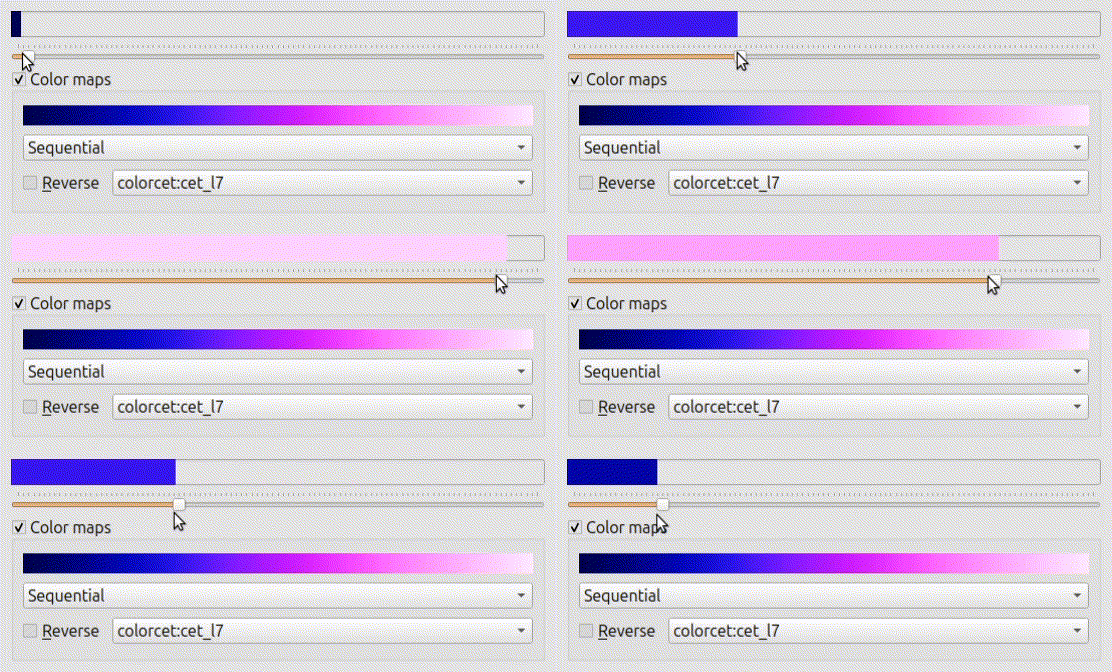
And here’s the code for both it and code to showcase it like the animations above.
import sys, os
from collections import defaultdict

from PySide6.QtCore    import  Qt
from PySide6.QtGui     import  QPixmap, QImage
from PySide6.QtWidgets import (QApplication, QCheckBox, QComboBox, QGroupBox,
                               QGridLayout, QHBoxLayout, QLabel, QProgressBar,
                               QSlider, QVBoxLayout, QWidget)

try:
    import numpy as np
    import cmap
except ImportError:
    cmap = None

class healthBar(QProgressBar):
    "modified progress bar used to show signal health or quality"
    # from Orthallelous
    # if the max or min values are changed, _set_colors will need to be called
    def __init__(self, parent=None):
        super().__init__(parent)

        # build the health color list
        css = 'QProgressBar::chunk{{background-color:rgb({},{},0);}}'
        cols = []
        for i in range(50):  # going from red to yellow
            # r: 1.0 to 1.0, g: 0.0 to 1.0, b: 0.0 to 0.0
            cols.append(css.format(255, int(round(5.1 * i))))

        for i in range(50, 101):  # going from yellow to green
            # r: 1.0 to 0.0, g: 1.0 to 1.0, b: 0.0 to 0.0
            cols.append(css.format(int(round(5.1*(100-i))), 255))
        # the above is only valid for when the progessbar values are 0 and 100

        self._default_cm = cols
        self._cmap = None
        self._set_colors()

        self.valueChanged.connect(self._set_bar_color)
        self.setFormat('')

    def _set_bar_color(self, val=0):
        "internal signal to set the color for when the value changes"
        mxx, mnn = self.maximum(), self.minimum()
        ptv = mxx - mnn
        val = val - mnn
        if self._cmap is None:
            val = int(val / ptv * 100.0)
            self.setStyleSheet(self._css[val])
            return

        if val >= mxx: val = mxx - 1
        if val <= mnn: val = mnn

        if self._cmap is not None and self._cmap.category == 'qualitative':
            val = int(val / ptv * len(self._css))

        self.setStyleSheet(self._css[val])
        return

    def _set_colors(self):
        "build the css colors from the colormap"
        # used when changing colormap with cmap
        mxx, mnn = self.maximum(), self.minimum()
        if self._cmap is None:
            self._css = self._default_cm.copy()
        else:
            css = 'QProgressBar::chunk{{background-color:rgb({},{},{});}}'
            cols = self._cmap(np.linspace(0, 1, mxx - mnn), bytes=True)
            self._css = [css.format(r, g, b) for (r,g,b,a) in cols]
        self._set_bar_color(self.value() - mnn)
        return

    def setColorMap(self, cm=None):
        "set the colormap for the health bar"
        if cm is None:  # switch to default
            self._cmap = None
            self._css = self._default_cm.copy()
        else:  # cmap can be a string or a cmap.Colormap
            if cm == 'health': cm = self._default_cm
            elif cm == 'health_r': cm = self._default_cm.reversed()
            elif type(cm) == str: cm = cmap.Colormap(cm)
            elif type(cmap)==cmap.Colormap: cm = cmap
            else: raise ValueError
            self._cmap = cm
        self._set_colors()
        return


class hbarExample(QWidget):
    "widget for showcasing the healthbar widget"
    # from Orthallelous
    def __init__(self, parent=None):
        super().__init__(parent)
        sty = self.style()
        ico = sty.standardIcon(sty.StandardPixmap.SP_MessageBoxQuestion)
        self.setWindowIcon(ico)
        self.setWindowTitle('0 %')

        self.hbar = healthBar()#QProgressBar()
        self.hbar.setTextVisible(False)

        self.slider = QSlider()
        self.slider.setOrientation(Qt.Horizontal)
        self.slider.setTickPosition(QSlider.TicksAbove)
        self.slider.setRange(0, 100)
        self.slider.setValue(0)

        self.slider.valueChanged.connect(self.hbar.setValue)
        self.slider.valueChanged.connect(lambda x:self.setWindowTitle(f'{x}%'))

        # coloring
        self.cgrp = QGroupBox('Color maps')
        self.cgrp.setCheckable(True)
        self.cgrp.setChecked(False)

        if cmap is not None:
            # have cmap installed, add option to change the colormaps

            # sort the colormaps
            tmp = defaultdict(list)
            for i in cmap.Catalog().unique_keys():
                cm = cmap.Colormap(i)
                tmp[cm.category].append(cm.name)
                tmp['all'].append(cm.name)
            self._cmaps = {k: sorted(tmp[k]) for k in sorted(tmp.keys())}
            self._ctidx = {k: 0 for k in self._cmaps}

            self.catsCB = QComboBox()
            for i, cat in enumerate(self._cmaps):
                self.catsCB.addItem(cat.capitalize())
                self.catsCB.setItemData(i, cat, Qt.ToolTipRole)

            self.cmapCB = QComboBox()
            self.cmapCB.setMaxVisibleItems(20)
            self.cmapCB.view().setAlternatingRowColors(True)

            self.cmapLabel = QLabel()
            self._cmap_imgs = dict()
            self.cmapLabel.setScaledContents(True)
            self.cmapLabel.setFixedHeight(20)

            self.revCB = QCheckBox('&Reverse')
            self.revCB.setToolTip('Reverse the colormap')
            self.revCB.setFixedWidth(self.revCB.minimumSizeHint().width())

            __rev = lambda x: self._setCmap(self.cmapCB.currentText())
            self.revCB.clicked.connect(__rev)

            self._setCmapTypes('all')
            self.cgrp.clicked.connect(self._setDefaultMap)
            self.catsCB.currentTextChanged.connect(self._setCmapTypes)
            self.cmapCB.currentTextChanged.connect(self._setCmap)
            self._setDefaultMap()

            sb = QGridLayout()
            sb.addWidget(self.cmapLabel, 0, 0, 1, -1)
            sb.addWidget(self.catsCB,    1, 0, 1, -1)
            sb.addWidget(self.revCB,     2, 0)
            sb.addWidget(self.cmapCB,    2, 1)
            self.cgrp.setLayout(sb)

        ly = QVBoxLayout()
        ly.addWidget(self.hbar)
        ly.addWidget(self.slider)
        if cmap is not None: ly.addWidget(self.cgrp)

        self.setLayout(ly)
        return

    def _setDefaultMap(self):
        "set using the default heathbar coloring or not"
        if self.cgrp.isChecked():
            self._setCmap(self.cmapCB.currentText())
        else:
            self.hbar.setColorMap(None)
        return

    def _setCmapTypes(self, s):
        "set which colormaps to show in combo box based on colormap category"
        self.cmapCB.blockSignals(True)
        self.cmapCB.clear()

        q = sorted(self._cmaps[s.lower()])
        for i, c in enumerate(q):
            self.cmapCB.addItem(c)
            self.cmapCB.setItemData(i, c, Qt.ToolTipRole)
        #self.cmapCB.addItems(q)

        self.catsCB.setToolTip(s)
        self.cmapCB.setCurrentIndex(self._ctidx[s.lower()])

        vw = self.cmapCB.view()
        vw.setMinimumWidth(vw.sizeHintForColumn(0) +
                           vw.verticalScrollBar().sizeHint().width())
        self.cmapCB.blockSignals(False)
        self._setCmap(self.cmapCB.currentText())
        return

    def _showCmap(self, s):
        "generate and show a colormap"
        pix = self._cmap_imgs.get(s)
        if pix is None:
            # generate image
            try: cm = cmap.Colormap(s)
            except ValueError as err:
                cm = _more_cmaps.get(s)
            raw = np.zeros((10, 256, 3), np.uint8)
            cols = cm(np.linspace(0, 1, 256), bytes=True)
            for i, c in enumerate(cols): raw[:, i, :] = c[:3]

            img = QImage(raw.data, raw.shape[1], raw.shape[0],
                         raw.strides[0], QImage.Format_RGB888)
            pix = QPixmap.fromImage(img)
            self._cmap_imgs[s] = pix

        self.cmapLabel.setPixmap(pix)
        return

    def _setCmap(self, s):
        "set colormap for healthbar based on cmapCB"
        if not s: return
        if self.revCB.isChecked(): s = s + '_r'
        cat = self.catsCB.currentText().lower()
        self._ctidx[cat] = self.cmapCB.currentIndex()

        self._showCmap(s)
        self.hbar.setColorMap(s)
        self.cmapCB.setToolTip(s)
        self._ccmap = s
        return


if __name__ == '__main__':
    APP = QApplication(sys.argv)
    win = hbarExample()
    win.show()
    sys.exit(APP.exec())
 Orthallelous
Leave a comment