

Here’s a short thing on how to put a constraint on a value.
Say you have some unconstrained value x and you need it to be between two values. If you’re doing this, then you’re probably trying to do a least-squares fitting of some function. Why you’d want to do this is because your value can grow to infinity but the actual value you’re after certainly isn’t infinity. In any case, you’re getting infinities which make no sense in your context, so you need to constrain the value. So for an unconstrained value x that must be between a lower bound w and an upper bound u, the resulting constrained value is q, and that’s the value you will end up using.
There’s two ways to do it: a minmax function, or parameter transformation.
The first method is to slam the door into x. If the value is greater than an upper bound or lesser than a lower bound, harshly slam the door on it and force it to be the upper or lower bounds:
def minmax(x, lower=-10, upper=+10):
    "Force x to be between lower and upper bounds"
    return min(max(x, lower), upper)
This is what Matlab does with its least square fitting functions; simple, if rather rude to the variable!

The second method, parameter transformation, is more polite. It gives a smooth transition between the variable and the bounds, but can result in the floating point math to overflow.
At least, that’s what the original references did. This method took some digging to find, only to find a dead forum and a dead link to go off of. And even then, not only did the references have the variable overflow, they also failed to handle the upper and lower bounds correctly! So here is the corrected method so it never overflows and correctly handles the bounds:
from math import exp
def constraint(x, lower=-10, upper=+10):
    "Constrain x to be between lower and upper bounds"
    if x > 0:
        # done this way for +x so there's never an overflow
        return lower + (upper - lower) * (1 / (1 + exp(-x)))
    else:
        ex = exp(x)
        return lower + (upper - lower) * (ex / (1 + ex))
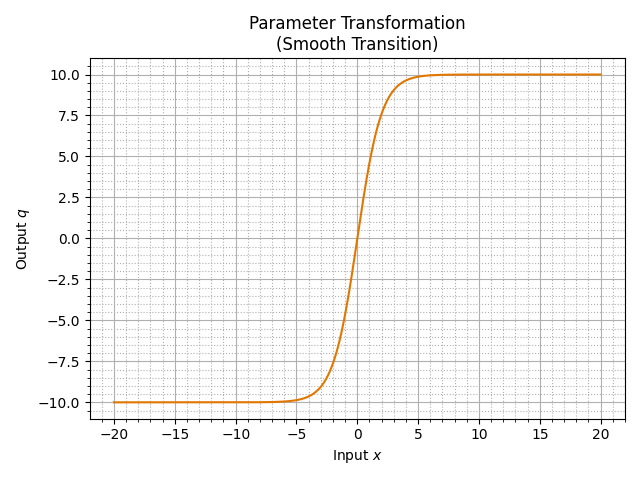
As x heads off to infinity in either direction, this transforms it to be closer and closer to the bounds you’ve placed on it, which might be what you need for your specific case; or you just like things to be smooth. Although it does have a quirk which might not be helpful – the transition between the bounds seems to happen to x being within ±5, so I might have to look into this again, but it’s fine for now.
So if you ever have to write your own least-squares fitting algorithm (say, the Levenberg–Marquardt one), you can now put bounds on what you’re fitting, smoothly and correctly – and don’t have to go digging around dead sites only to find poorly implemented constraint systems like I had to…
 Orthallelous
[…] Previously, I took a look at how to constrain a number to be between two values and two ways to do that. The second method which gives a smooth transition between the input x and output q only applies when x is within ±5 or so. This would be an issue if you’re like “I know my value is between 120 and 180, so I’ll vary x between 90 and 270 and apply the constraint” – because x is never between -5 and 5, you would only ever get the upper bound of 180 from it and nothing else. Here’s an animation of what I mean: […]