

This is a program I wrote that encrypts and decrypts files. But honestly I made it to play with the progress bars that PyQt has.
As you can see from the picture above, there’s multiple progress bars – one for encrypting, one for decrypting and one for hashing. Additionally, there’s a random change for them to ‘deload’ when opening the program – takes about 2 seconds but is just for show. Also, for more fun, stuffed in at the bottom of list in the hash button, has the progress bars do things! Stretch the program so it’s the width of the screen for maximum party!
But enough about the progress bars, what does this program do? The open button lets you locate a folder, and then the white box on the left will list the files within the folder. Selecting one of them will let you encrypt it, given a key. Once encrypted, it’ll show up in the folder list highlighted. Decrypting is the same, the decrypted file will be highlighted a different color in the folder list.
Now about the key; you know how websites demand that they be between something like 2 to 22 characters long and require certain special characters? And then don’t tell you that until you try to make a key? Or worse, silently truncate it to 15 characters and then tell you it’s not the right password the next time you try logging in? That’s just dumb.
Here, you can use just about any Unicode character you want (up to unichr(65535); this is a Python 2 limitation). I did put a character limit on it – at least 8 characters long, and at most 4096 characters long – and it will tell you how long your password is while you’re entering it. So if your key is a short story, go right ahead and use it.
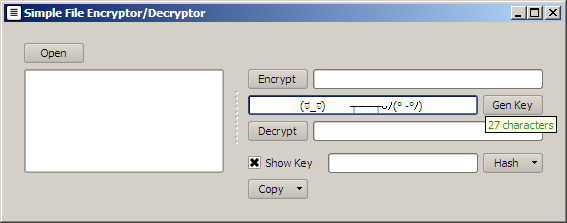
Here, the program tells you the length of the password you just entered; its greenness tells you it is a valid length.
Encrypting adds ‘.enc’ extension to the file and decrypting removes whatever extension is on the encrypted file. Files without extension won’t show up in the folder list. The encryption and decryption part is done by the pycrypto module.
This program can work with either PyQt4 or PySide – mostly. I haven’t figured a way around it, but use of the clipboard in PySide causes… issues…. But other than that, it’ll work fine. The compiled exe file for download uses PyQt4 by the way. The program will clear the clipboard when closed, whether you used it or not.

You can download the exe file from this link.
And of course, here is the source code.
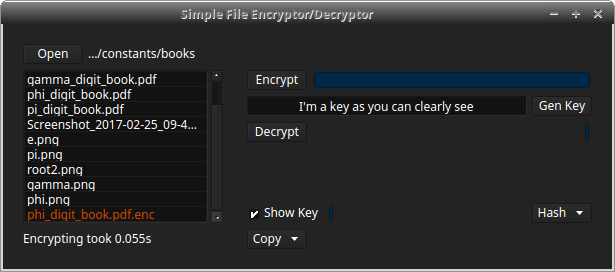
Here, the program highlights the file that you just encrypted.
P.S. The icon took several hours to make because I only know how to make such things via code. The thought process for design was “This program encrypts things, so it should be a padlock. Wait no, I can’t draw. How about… umm… stripes! And they should umm… fade! yes, that’s it!”
P.P.S. I did set different colors to these progress bars but I can’t seem to get it to show on all OS’s for some unknown reason. I hope I fixed it. Also, the party doesn’t always go as fast as it’s supposed to (sadly).
 Orthallelous
Leave a comment